One domain in, thousands of names out
There is now a build of Amass with ndxer in it. You pass one domain, as you always do. ndxer adds the domains it links to the same owner to the session's scope, so every Amass plugin runs on them too, and an ndxer data source lists the hostnames ndxer holds under every domain in scope.
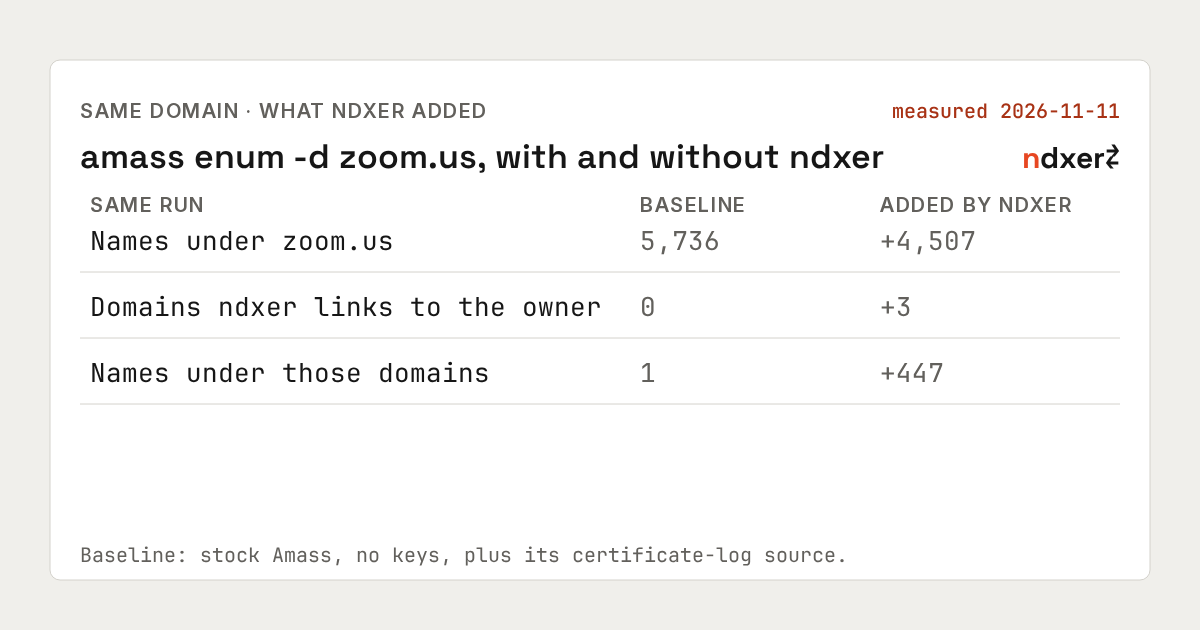
On 2026-11-11 we ran amass enum -d zoom.us twice, at the same time, with the same build and every default data source: once without an ndxer key and once with one. Counting only names ndxer itself returned, the run with ndxer added:
- 4,507 names under
zoom.usthat the baseline didn't have. 4,405 of them (98%) answered in DNS during the run. - 3 domains ndxer links to the same owner:
zoom.com,zoomgovstatus.comandzoomstatus.com. - 447 names under those 3 domains, 442 of them under
zoom.com.
The baseline is stock Amass with no API keys for other providers, plus everything its certificate-log source returned for zoom.us that day: 5,736 names.
The short version. On
zoom.us, ndxer added 4,507 hostnames to what Amass and its certificate-log source returned together, 4,405 of them live, and one more domain with real volume under it.
4,405 of them answer
Amass resolves every name it holds, with its own wildcard detection on. 4,405 of the 4,507 answered during the run: 2,091 with a CNAME, 2,306 with an IPv4 address and 1,112 with IPv6. A name can have more than one of those, so the three add up to more than 4,405. The other 102 didn't answer that day; 5 of them are mail policy names, which carry only TXT records that Amass doesn't ask for.
Zoom names its hosts by service, region and data center, so the 4,507 can be grouped by their first labels (the patterns are under How we measured):
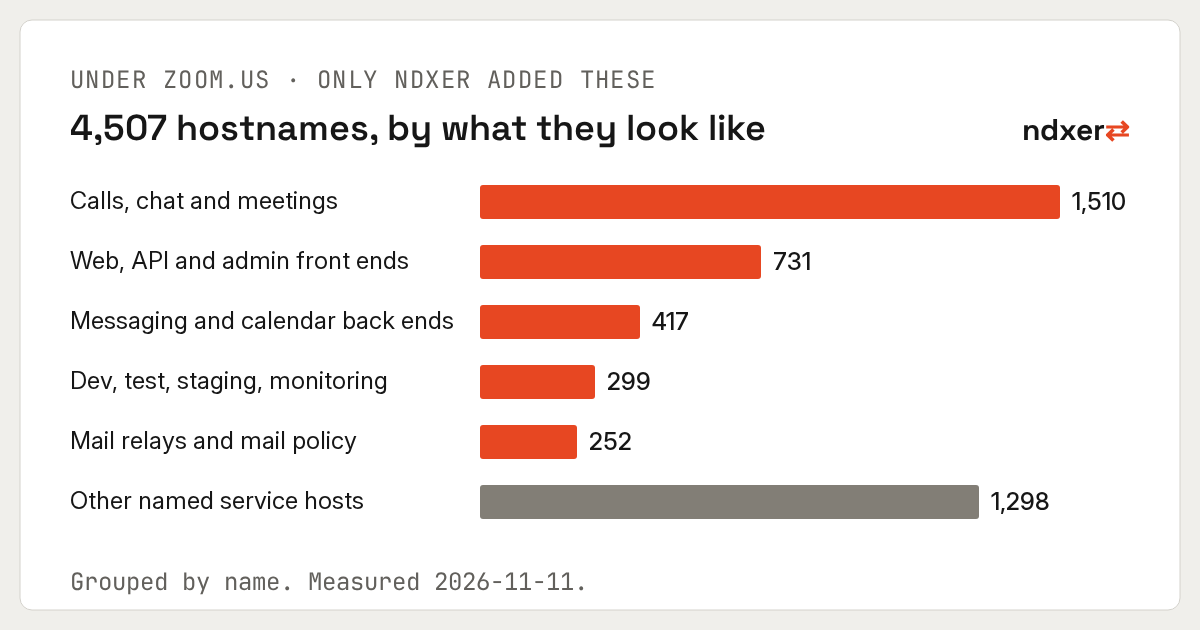
The largest group is the calling and chat side of the product: the chat, phone, meeting and push servers, numbered per region and data center. The groups go by name alone; what runs on each host is yours to look at.
We aren't listing the names here. Sign up and look zoom.us up yourself.
3 more domains, same owner
Before the other plugins start, the build asks ndxer which domains share values with the one you passed, and adds the ones ndxer classes as the same owner's to the session's scope. For zoom.us that was 3, each with the value it shares:
zoom.compublishes the same site verification token for a single sign-on provider, issued to one account, and shares a mail host withzoom.us. ndxer listed 442 names under it.zoomgovstatus.comandzoomstatus.compublish the same status page verification token, issued to one account. ndxer listed 3 and 2 names under them.
The run found them without being asked. Amass's own scope expansion ran in both runs and didn't add them, and the run without ndxer had 1 name under zoom.com, the domain itself.
ndxer also lists 115 domains with weaker evidence of the same owner. They stay out of scope by default and go to the session log, each with its reason and the values behind it; one setting adds them (NDXER_RELATED_CLASSES=subject,review). 12 values zoom.us shares belong to infrastructure providers, and those are never used to add a domain.
A related domain is a lead, not permission. Check the program's scope before you send a single request to it. The value each domain shares is what you show the program when you ask.
What a run looks like
This is the terminal of a real run on 2026-11-11, cropped to the ndxer lines. They appear at the top, before the other plugins' results:
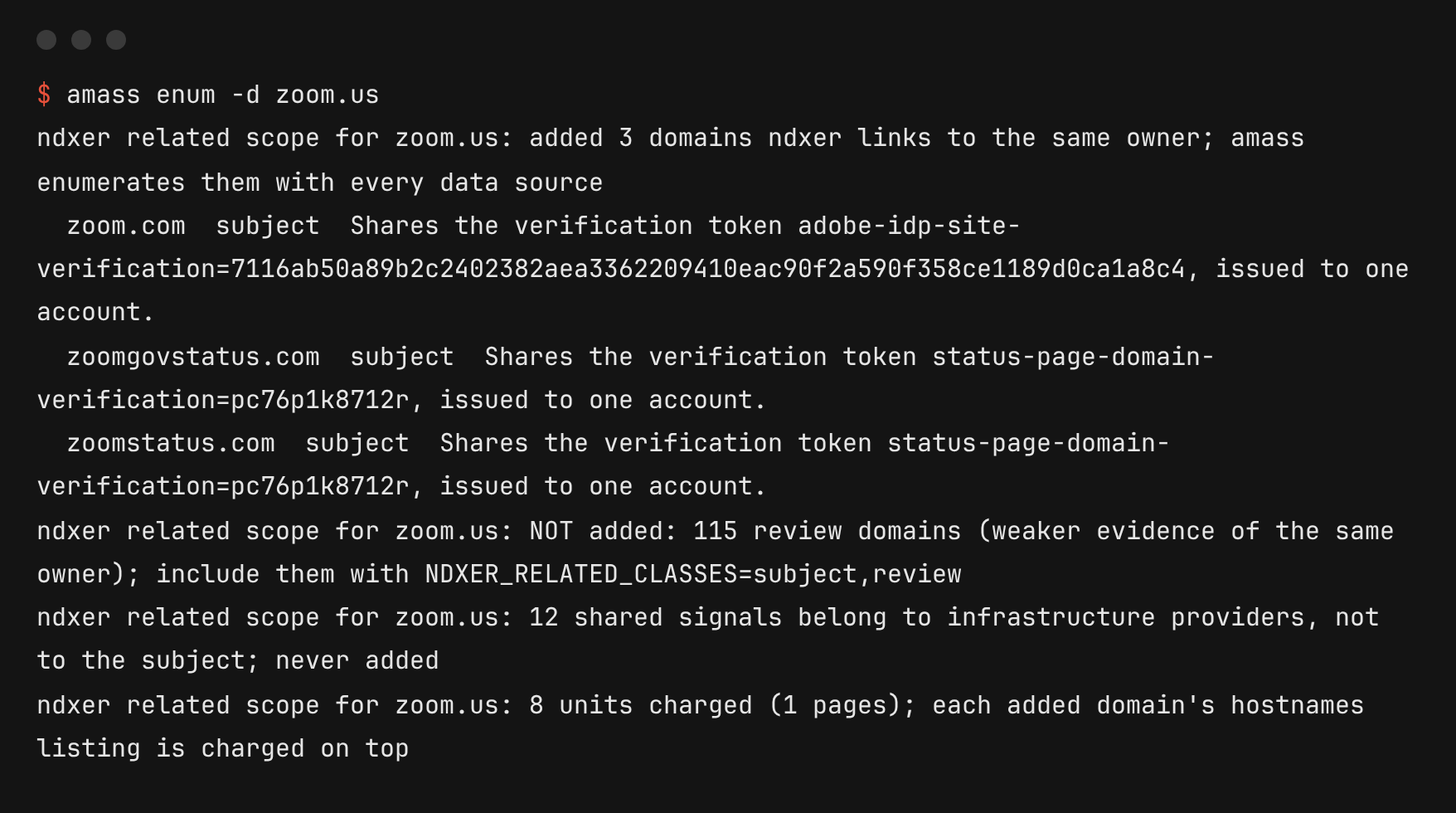
When a domain's list isn't complete yet, the build waits for it, up to 15 minutes per domain, and says so on the terminal, so one run gets the whole list. NDXER_NO_WAIT=1 takes what is there and flags it.
When the run ends, amass subs lists the names under every domain you name:
amass subs -names -d zoom.us,zoom.com,zoomgovstatus.com,zoomstatus.comThe numbers, reconciled
Amass's certificate-log source returned nothing inside either run. Sent directly, the same request returned 4,310 names under zoom.us that day, so we added them to the baseline rather than compare against a run without them.
Names under zoom.us |
Count |
|---|---|
| Run without ndxer | 1,457 |
| Certificate-log source, same request sent directly | 4,310 |
| in both of those | 31 |
| Both together: the baseline | 5,736 |
| Returned by ndxer in the run with ndxer | 6,189 |
| of which already in the baseline | 1,682 |
| of which new: added by ndxer | 4,507 |
ndxer works alongside your certificate-log source: 1,587 of its 4,310 names were among ndxer's that day, and the 4,507 above are names that request didn't return. Keep both in your run.
Once ndxer had handed Amass its names and domains, Amass's own plugins found more names from them. Amass found those, so they aren't counted as ndxer's. Amass doesn't return exactly the same names twice: 595 names under zoom.us were in the run without ndxer and not in the run with it.
How we measured
- Build: the
ndxerbranch of github.com/southax/amass as of 2026-11-11, which is Amass v5.1.1 plus the ndxer data source. - Runs:
amass enum -d zoom.ustwice, started together on 2026-11-11 from one machine, every default data source on, no API keys for other providers; one run withNDXER_API_KEYset and one without. The run without ndxer ended on its own after 68 minutes with no new results for 10. The run with ndxer was still finding names when we stopped it at 90 minutes. This is one domain on one day; what ndxer adds varies by domain. - Counting: names in each run's asset database equal to
zoom.usor ending in.zoom.us. A name counts as ndxer's if thendxerdata source returned it and neither the run without ndxer nor the certificate-log source had it. Live means Amass stored at least one A, AAAA or CNAME answer for it in that run. - Groups, by the first labels, in this order: calls, chat and meetings (
xmpp,sip,pbx,turn,sbc,zpns,mqtt,wss,peer,media,meeting,webinar,rtc,voice,zc,cci); mail (smtp,mail,mta,imap,_dmarc,_spf,domainkey,mx); dev, test, staging and monitoring (dev,test,stg,staging,qa,internal,monitor,prom,grafana,kibana,jenkins,gitlab,uat,sandbox,perf,beta,infra); messaging and calendar back ends (asynccomm,scheduler,caldav,ngxpls,filechecker,calendar,zcal,docs,tasks,whiteboard,notes); web, API and admin front ends (web,api,www,admin,portal,console,app,nginx,proxy,gateway,gw,cdn,static,auth,sso,login); everything else is other.
Try it
The build is at github.com/southax/amass. Its README has the install, the key setup, the settings and what each terminal line means. The same NDXER_API_KEY works for the subfinder build. You need a key from your API keys page. The build is also listed on the Integrations page.
Run it on a target you know
Pick a domain you know well. Run your usual amass enum on it, then the same command with this build, and compare the two lists the way we did. The names only the second run has, and the domains it added to scope, are what ndxer brings to your Amass session.